 Search
 Register
 Bonuses
 Tournaments

 LOBBY
 SLOTS
 LIVE
SpinChester Casino Login & Registration for Players from the United Kingdom

Creating a Spinchester account for real-money gaming is open to UK residents aged 18 and older on both desktop and mobile devices. The registration process requires personal information, including full name, address, email and password. The whole process can be completed within 2-3 minutes, after which the user can log in. However, KYC is still required afterwards. The following guide shows you how to sign up at SpinChester Online Casino, access your profile and complete KYC from the UK.
SpinChester Login Guide
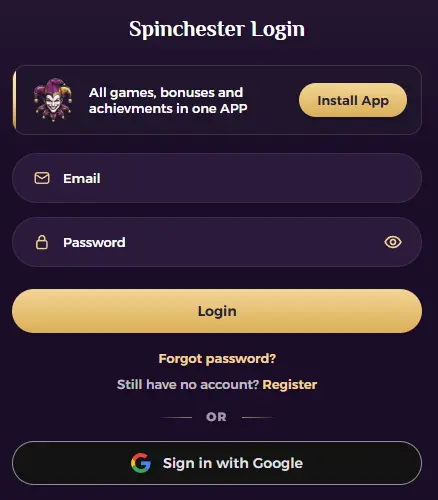
To sign in to your profile, you need the email address and password you created during registration. Just follow these steps.
- Start the process: Tap the “Sign in” button in the upper right corner of the website.
- Enter details: Share your email address and password.
- Confirm: Double-check the data and approve.
- Play: You will be directed to the main casino page.
To access the profile, you need to open the control panel on the left side and click “more.” This is where the shortcut to the profile, KYC and other elements is located. To com
SpinChester Log In on Mobile Via PWA and Browser
Members from the United Kingdom access and fully control their profile using a smartphone or a tablet. First, you can use a mobile version of the website. Load the main page on the device and follow the same steps mentioned earlier. However, if you want to use the app, check out this guide.
- Load the site: Use a smartphone to visit the casino’s page.
- Open features: Tap the three dots in Chrome or “Share” in Safari.
- Get the app: Click “Add to Home Screen.”
- Approve: Allow the installation to complete.
- Load: Tap the icon on your phone’s home screen.
- Log in: Initiate by clicking the “Sign in” button.
- Enter details: Provide your email and password and approve.
SSL and Account Protection
The Spinchester casino login is secure, so you don’t need to worry about losing your data or facing related issues. Equally important, this casino uses several systems that protect all players in the United Kingdom. The available ones are:
- SSL: A 256-bit SSL encryption is implemented. It encrypts data between your device and the website’s servers.
- Email verification: Members have to verify their email address, which adds another layer of security.
- Phone number verification: Complete this step to get personalised offers and further secure your account.
- KYC: The Spinchester verification is mandatory and allows you to connect your identity with the personal data you have provided to the casino.
Spinchester Login, Register Explained
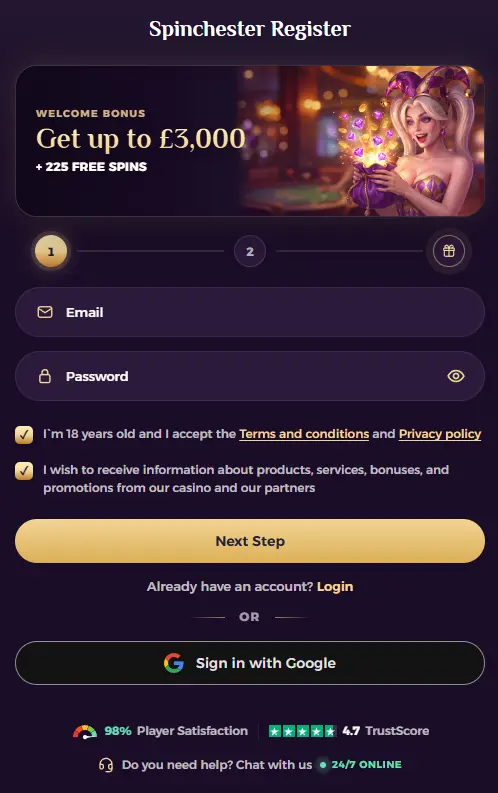
Only 5 steps are required to sign up and become a customer. Just follow these steps.
- Start the process: Tap the “register” button in the upper right corner of the page.
- Enter email: Share your email address, full name and create a password.
- Provide personal details: Share your address, telephone number and similar details.
- Claim bonus: Choose to trigger the welcome bonus.
- Log in: Approve the Spinchester registration and login.
The data you provide during registration will not be shared with third parties and is encrypted on the servers. They will be used for verification purposes.
Spinchester Verification (KYC) For British Players

All customers must complete KYC verification, which is mandatory in the United Kingdom. The process involves uploading photos of specific documents for approval. The following table shows which documents you need to share.
| Verification | Documents | Reason |
| Proof of identity | Passport, driver’s licence, ID card or residence permit. | To match the data to a person. |
| Proof of address | Government letter, bank statement or official documents. | Location verification. |
| Proof of deposit | Screenshot or photo of the transaction. | Proving that you have made a deposit to the casino. |
The maximum file size is 5 MB. The casino accepts JPEG, JPG, PNG, GIF, TIFF, BMP, SVG, PDF file formats. Complete the initial Spinchester log in and start verification, as it can take 24-72 hours.
Login Complications and Solutions
In rare cases, you may have trouble accessing your profile. If this happens, check the table below to find the cause and fix it.
| Issue | Cause | Solution |
| Wrong email | Error in the address | Re-enter and double-check. |
| Wrong password | Typing error or Caps Lock is on. | Re-type the password. |
| Log in unavailable | Accessing the website from a restricted region. | Try when you return to the UK. |
| Unable to access the profile | Suspended account | Contact support team |

Resetting Account Password
If the Spinchester login free is unavailable due to a forgotten password, reset it following these steps.
- Load: Tap the “sign in” button in the upper right corner of the main page.
- Start resetting: Click the “forgotten your password” button.
- Enter email: Enter the email address.
- Tap the link: Click the link that was sent to you.
- Create a new password: Enter a new, secure password.
Closing The User Account at Spinchester
Immediately after the Spinchester login or register procedures are completed, you can close the profile on the site and stop playing. To do so, contact support by following these steps.
- Log in: Enter your credentials and access your profile on the site.
- Contact support: Use the live chat feature to contact the support team.
- Explain: Tell them about the account deletion request.
- Confirm: Allow them to remove your account from the database.
The whole procedure will take up to 24 hours, and you will be notified by email once it is done./ However, you can also use a responsible gambling tool called self-exclusion. This will ban your profile from the site for a period of time you choose. Creating a new account won’t be possible either.
FAQ
How do I log in to Spinchester Casino?
Go to the official Spinchester website or open the installed app, tap "Login" in the top corner, and enter your registered email and password.
I forgot my Spinchester password — how do I reset it?
Click "Forgot Password" on the login screen, enter your registered email, and follow the reset link sent to your inbox to create a new password.
Can I have more than one Spinchester account?
No. Spinchester allows only one account per player, IP address or household. Creating multiple accounts will result in suspension.
Why can't I log in to my Spinchester account?
Common causes include an incorrect password, an unverified email address, or a temporary suspension due to responsible gambling limits or KYC issues. Contact live chat if the problem persists.
Can I log in to Spinchester from the mobile app?
Yes. If you've installed the PWA on Android, iOS, Windows or macOS, you can sign in directly from the home-screen icon using the same credentials as the website.
Is it safe to log in to Spinchester on public Wi-Fi?
Spinchester uses 256-bit SSL encryption to protect data in transit, but it's still safer to avoid logging into real-money accounts on unsecured public networks when possible.
What should I do if my account is locked?
This is usually related to KYC verification, self-exclusion, or a security check. Contact the support team via live chat or email to confirm your account status and next steps.
Do I need to verify my email before logging in?
You can typically log in after registration, but email verification is required before you can make your first withdrawal.